> For the complete documentation index, see [llms.txt](https://developer.gyfti.fr/llms.txt). Markdown versions of documentation pages are available by appending `.md` to page URLs; this page is available as [Markdown](https://developer.gyfti.fr/hubspot-integration/setting-up-hubspot.md).
# Setting up HubSpot
#### Setup guide for Gyfti-App
Gyfti-App integrates Gyfti leads and accounts with HubSpot contacts and companies, which lets users:
* Sending gifts to contacts via HubSpot
* Rewarding their gufti Users with Points
[****](https://developers.hubspot.com/docs/apps/developer-platform/list-apps/listing-your-app/create-an-app-listing-setup-guide?utm_campaign=41448784-Rejected%20App%20Nurture\&utm_medium=email&_hsenc=p2ANqtz-9K3sJLsyClxM_10gIh2s1J9bwltKtWrCfd_JPywK5A7n3ci81bdSXkXgMOoMZSYLT41fWAxqpu75H-r76aPVGoUWHWNg&_hsmi=270205694\&utm_content=270205694\&utm_source=hs_automation#install-the-app)**Install the app**
* Log in to app.gyfti.fr
* Navigate to **Reglages** > **Integrations > Integrations natives** ()
* Click on Connect and you will be redirected to a new page to start the connection with HubSpot
* Click **Connecter**.
* Select your **HubSpot account**.
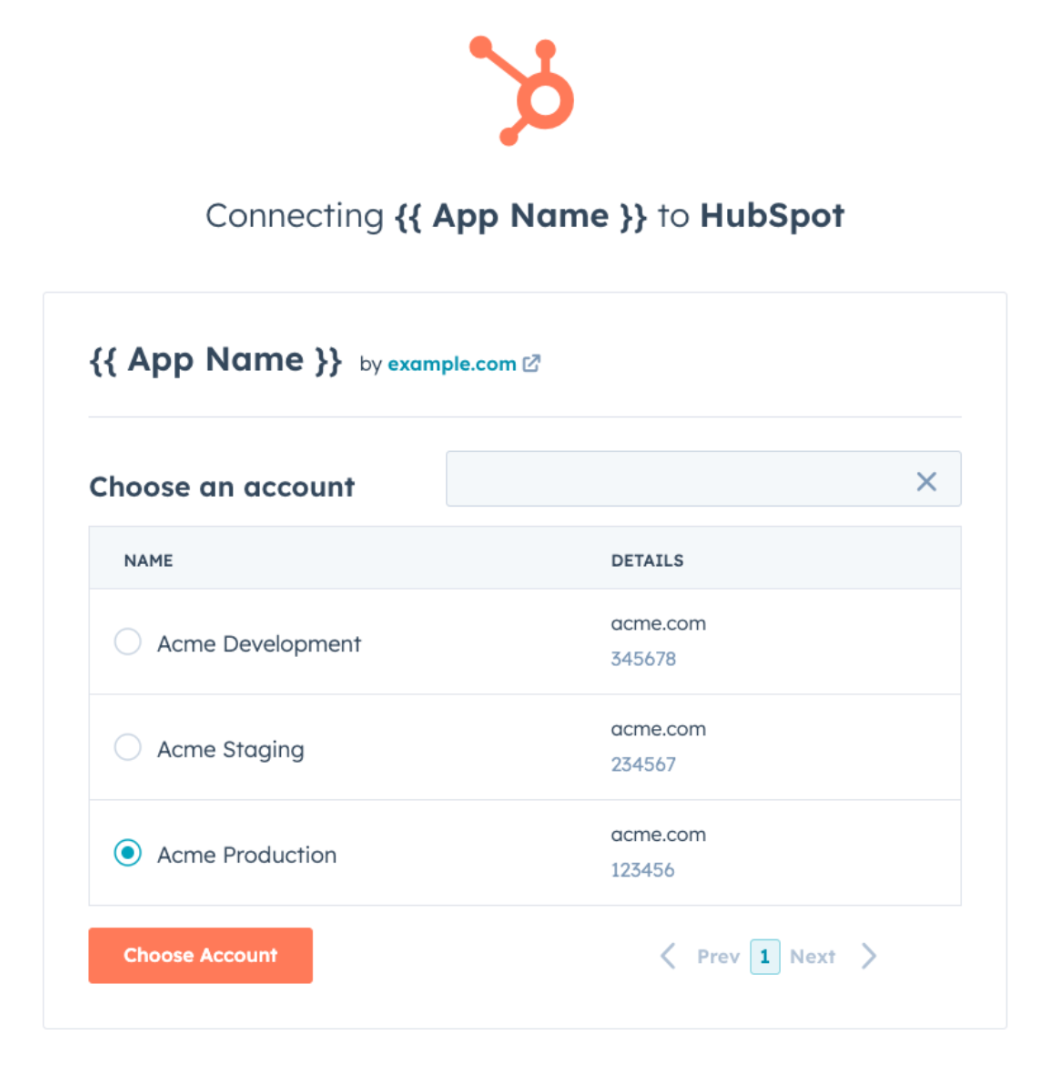
* Click **Choose Account**.
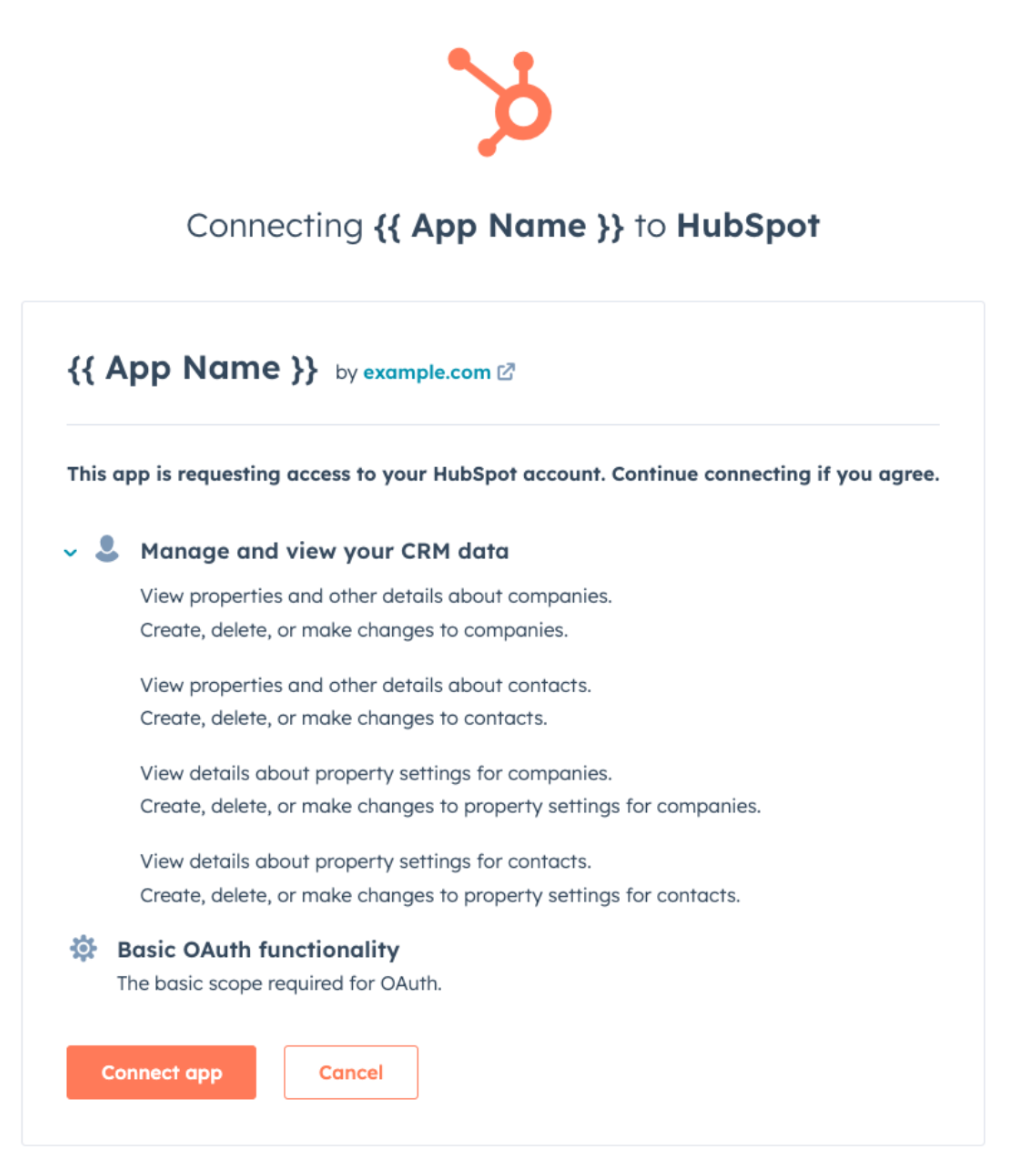
* Review the requested scopes on this screen. Gyfti-App requests access to read and write contacts & companies, as well as read and edit contact & company properties.
* Click **Connect app**.
* You will be redirected to the app.gyfti.fr “Integrations” page and you will see now you HubSpot account is connected.
[****](https://developers.hubspot.com/docs/apps/developer-platform/list-apps/listing-your-app/create-an-app-listing-setup-guide?utm_campaign=41448784-Rejected%20App%20Nurture\&utm_medium=email&_hsenc=p2ANqtz-9K3sJLsyClxM_10gIh2s1J9bwltKtWrCfd_JPywK5A7n3ci81bdSXkXgMOoMZSYLT41fWAxqpu75H-r76aPVGoUWHWNg&_hsmi=270205694\&utm_content=270205694\&utm_source=hs_automation#use-the-app)**Use the app**
With Gyfti, you can send gifts to your HubSpot contacts or reward users with points after they complete a challenge. To learn how to set this up, refer to the following sections:
[Sending gifts via HubSpot](/hubspot-integration/sending-gifts-via-hubspot.md)
[Rewarding Users with Points](/hubspot-integration/rewarding-users-with-points.md)
[****](https://developers.hubspot.com/docs/apps/developer-platform/list-apps/listing-your-app/create-an-app-listing-setup-guide?utm_campaign=41448784-Rejected%20App%20Nurture\&utm_medium=email&_hsenc=p2ANqtz-9K3sJLsyClxM_10gIh2s1J9bwltKtWrCfd_JPywK5A7n3ci81bdSXkXgMOoMZSYLT41fWAxqpu75H-r76aPVGoUWHWNg&_hsmi=270205694\&utm_content=270205694\&utm_source=hs_automation#disconnect-the-app)**Disconnect the app**
{% hint style="info" %}
**Note:** If you disconnect your HubSpot account from Gyfti, triggers (challenge submissions, signup, and login) will stop sending data from app.gyfti.fr.\
Actions such as sending digital or postal gifts will also stop working.
{% endhint %}
* Log in to [app.gyfti.fr](https://app.gyfti.fr).
* Navigate to **Reglages** > **Integrations > Integrations natives**. ()
* Locate the HubSpot card.
* Click **Supprimer**.
* Write **SUPPRIMER** and click Oui,supprimer
[****](https://developers.hubspot.com/docs/apps/developer-platform/list-apps/listing-your-app/create-an-app-listing-setup-guide?utm_campaign=41448784-Rejected%20App%20Nurture\&utm_medium=email&_hsenc=p2ANqtz-9K3sJLsyClxM_10gIh2s1J9bwltKtWrCfd_JPywK5A7n3ci81bdSXkXgMOoMZSYLT41fWAxqpu75H-r76aPVGoUWHWNg&_hsmi=270205694\&utm_content=270205694\&utm_source=hs_automation#uninstall-the-app)**Uninstall the app**
To uninstall Gyfti-App from your HubSpot account, follow the instructions in [this HubSpot Knowledge Base article](https://knowledge.hubspot.com/integrations/connect-apps-to-hubspot#uninstall-an-app).


